SELECT A TRACK. KEEP THE WORDS.
Extract subtitles from MKV
For an MKV containing an embedded SubRip text track, select the track with -map and copy it to an SRT file. This command extracts the first subtitle track from our downloadable example:
ffmpeg -i two-text-tracks.mkv -map 0:s:0 -c:s copy captions-en.srt
Run the command locally with FFmpeg. This page is a worked extraction guide; the browser converter does not open MKV files. Extracted SRT files can then be converted on the homepage.
Pick a subtitle stream before you extract it
The word after -i is your input file. The value after -map selects the input stream; -c:s copy copies its subtitle packets rather than asking a subtitle encoder to rewrite them. The command above is for an existing SubRip stream. Choosing an SRT extension does not turn image-based subtitles or burned-in lettering into text.
Start by reading FFmpeg's input stream list. In our experiment, this command printed the input streams and copied only the video into a null output, leaving the MKV unchanged:
ffmpeg -i two-text-tracks.mkv -map 0:v:0 -c:v copy -f null -
Read the input section of the log, not the later output stream numbers. Input stream indices describe the source container; the output can start numbering again.
Our two-track MKV, with real extracted results
We made a silent four-second video and two separate original subtitle files. The English file has two cues and starts at 0.125 seconds. The Spanish file also has two cues but starts at 0.250 seconds. Different words and time ranges make a mistaken selection visible. These are authored demonstration captions, not a transcription or translation of an existing film.
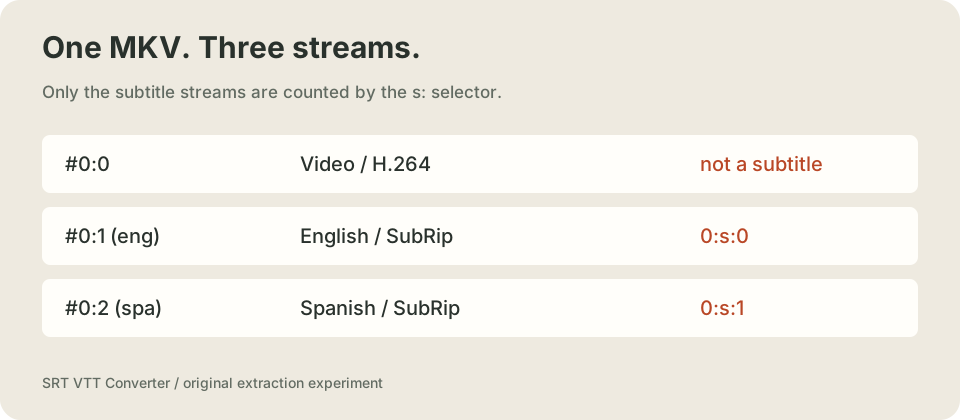
Stream #0:1(eng): Subtitle: subrip (srt) (default)
Stream #0:2(spa): Subtitle: subrip (srt)
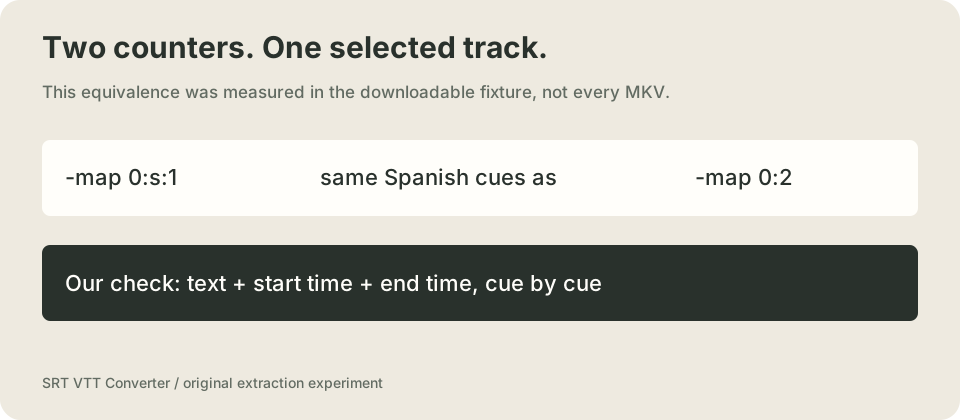
The first subtitle is 0:s:0, even though its global input stream is 0:1. The second subtitle is 0:s:1, even though its global input stream is 0:2. The subtitle selector counts subtitle streams only. Do not reuse our global indices on a different video without reading that video's stream list.
| Selection in this fixture | Actual output | Measured cue comparison |
|---|---|---|
-map 0:s:0 | English SRT, two cues | Both cue texts and both time ranges matched source-en.srt |
-map 0:s:1 | Spanish SRT, two cues | Both cue texts and both time ranges matched source-es.srt |
-map 0:2 | The same Spanish track | Cue text and timing matched the second-subtitle result |
Try the second track
ffmpeg -i two-text-tracks.mkv -map 0:s:1 -c:s copy captions-es.srt
Our comparison parsed each extracted SRT into its time range and caption text, then compared that ordered list with the corresponding source. We did not call the files identical merely because the command returned zero or the output filename ended in SRT. Blank-line packaging is outside that semantic comparison; the downloadable files and hashes let you inspect the actual bytes.
English output, read from the extracted file
1
00:00:00,125 --> 00:00:01,375
Choose the English subtitle track.

2
00:00:01,875 --> 00:00:03,125
The file stays separate from the video.
Spanish output, read from the extracted file
1
00:00:00,250 --> 00:00:01,500
Esta es la pista de subtitulos en espanol.

2
00:00:02,000 --> 00:00:03,500
Elige la pista antes de extraerla.
Measured locally on October 27, 2026 with ffmpeg version 7.1-essentials_build-www.gyan.dev Copyright (c) 2000-2024 the FFmpeg developers. The successful extraction commands returned exit code 0. Full commands, stderr, timestamps, original files and comparison results are available below.
Two deliberate failures, not made-up captions
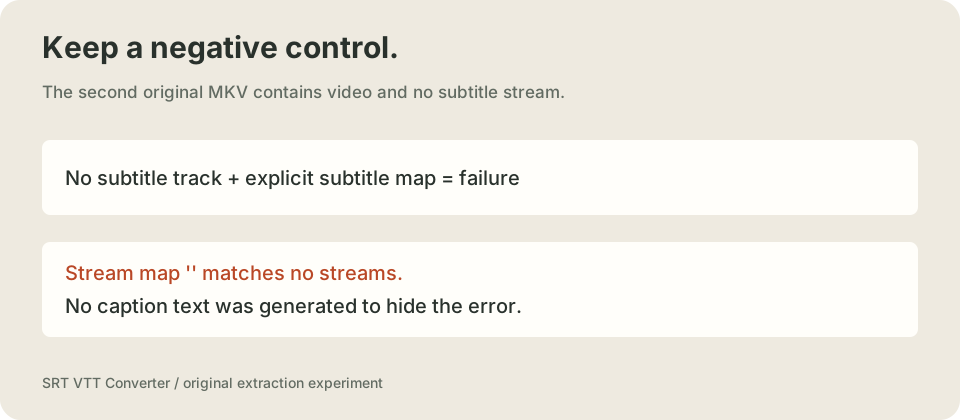
We made a second MKV from the same video without adding a subtitle track. The explicit first-subtitle map failed on that file. We also requested 0:s:2 from the two-track MKV; there is no third subtitle track, and that request failed too. Both are useful controls because a successful-looking empty file would not demonstrate extraction.
ffmpeg -i no-subtitles.mkv -map 0:s:0 -c:s copy empty.srt
Observed error lines from the no-subtitle run:
Stream map '' matches no streams.
Failed to set value '0:s:0' for option 'map': Invalid argument
Error parsing options for output file empty.srt.
We keep the explicit map in this test so absence becomes an error. A permissive command that ignores a missing stream answers a different question. Do not infer that a movie has no visible lettering just because it has no subtitle stream: text already painted into frames is not a separate stream to extract. This experiment tests embedded SubRip text only. It does not measure OCR, image-subtitle conversion, speech recognition, long-file speed or every Matroska subtitle codec.
Download the evidence bundle, one file at a time
- two-text-tracks.mkv
- no-subtitles.mkv
- source-en.srt
- source-es.srt
- captions-en.srt
- captions-es.srt
- captions-global-2.srt
- inspect-tracks.log.txt
- extract-first.log.txt
- extract-second.log.txt
- extract-global-index.log.txt
- missing-third-track.log.txt
- no-subtitle-track.log.txt
- test-results.json
| Original fixture | Bytes | SHA-256 of downloaded input |
|---|---|---|
| no-subtitles.mkv | 17245 | 1707bf5eb236ef30deead90d1ceff4baaf9b302192bfc2d96e2c35a68437cb84 |
| two-text-tracks.mkv | 17747 | d4f7629c328354d1322afb36fc6f91c9edfebce54ffb2114a5d0ec2d60a7857c |
Keep these fingerprints with your results. If you change either source caption file or remux the container, label that as another test instead of attributing the changed output to this recorded run.
Questions that come up during extraction
Why did I get the wrong language?
Select the subtitle entry shown in your own input list. A language tag helps identify a track, but our command selects a stream position, not a universal language. Our English and Spanish fixtures use different first cue times so you can check the selection against the extracted content.
Can I rename the MKV file to SRT?
No. The container includes video and its own structure. Our SRT outputs came from explicitly selecting a subtitle stream. Renaming a container is not that operation.
What do I do after I have an SRT file?
Open it as text to confirm the words and timing. If your next destination needs WebVTT, use the SRT to VTT converter. A working VTT sample can help you test your web player separately from extraction.
Watch the experiment explained
The visuals, fixture captions and explanation are original. The English narration is synthetic; no third-party film or customer video is used.
References and scope
For the command semantics, see the official FFmpeg stream-selection documentation and its stream specifiers. The downloadable examples and raw results on this page come from our local experiment. No claim is made that this evidence is absent from the entire web.